Blazor RichTextEditor
RichTextEditor is a dependency-free editor for HTML content. Its default toolbar includes document styles, font settings, text emphasis, colors, alignment, lists, links, images, tables, block content, fullscreen, printing, and history controls.
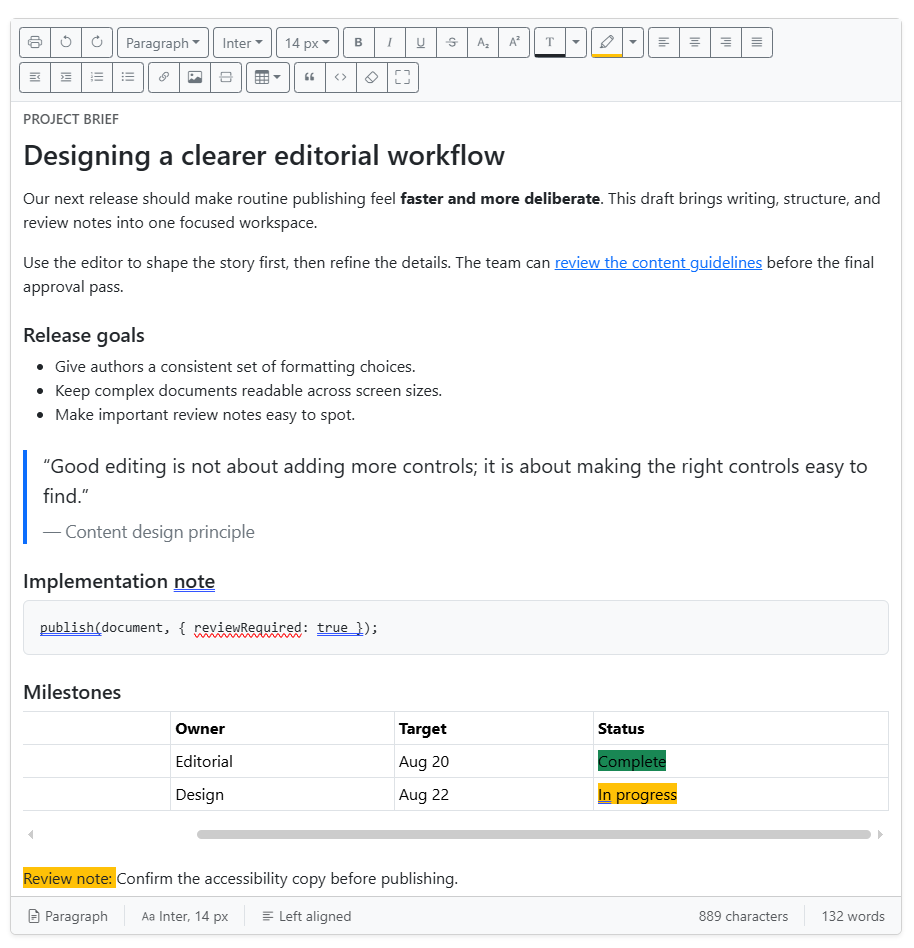
Get started
Add the component to a page, provide its initial HTML, and handle ValueChanged when the application needs the sanitized editor result.
<RichTextEditor Value="@editorInitialContent"
                ValueChanged="OnContentChanged"
                Placeholder="Write the article" />

<div class="mt-3">
    @(new MarkupString(committedHtml))
</div>

@code {
    private const string editorInitialContent = "<p>Draft</p>";
    private string committedHtml = editorInitialContent;

    private void OnContentChanged(RichTextEditorChange change) => committedHtml = change.Html;
}
Omit ToolbarItems to show the complete default toolbar. ValueChanged receives RichTextEditorChange, which contains sanitized HTML, plain text, character count, and word count.
Choose toolbar controls
Supply ToolbarItems when an editor should expose only the controls needed for its workflow.
<RichTextEditor Value="@content"
                ToolbarItems="@toolbarItems"
                Placeholder="Write a short update" />

@code {
    private string content = "<p>Short update</p>";

    private readonly RichTextEditorToolbarItem[] toolbarItems =
    {
        RichTextEditorToolbarItem.Bold,
        RichTextEditorToolbarItem.Italic,
        RichTextEditorToolbarItem.Link,
        RichTextEditorToolbarItem.OrderedList,
        RichTextEditorToolbarItem.UnorderedList
    };
}
Disabled state
Use Disabled as the sole inactive-state parameter. When it is true, the editor keeps its content visible for review but is not editable, and every toolbar action is unavailable. Hovering the inactive toolbar explains that editing is disabled. Set Disabled back to false to restore the existing editing and toolbar behavior.
Demo walkthrough
The RichTextEditor demo keeps seven scenarios in order: Full toolbar, Article draft, Publish rich update, Host-controlled image upload, Disabled, Form validation, and Events. Each scenario includes a short explanation and ordered How to use steps before its runnable source.
Host-controlled image upload
Use ImageUploadHandler when authors must select a local image. The Upload image tab is conditional: it is rendered only when this callback is configured; without it, the Image dialog intentionally shows only Image URL. The component never accepts a browser-configured upload endpoint, multipart fields or headers, response JSON paths, or client-held upload credentials. The host application owns authorization, storage, and the returned URL.
<RichTextEditor Value="@content"
                ToolbarItems="@toolbarItems"
                ImageUploadHandler="UploadImageAsync"
                AllowedImageFileTypes="@allowedImageFileTypes"
                MaxImageFileSize="@(5 * 1024 * 1024)"
                AllowedImageDomains="@allowedImageDomains" />

@code {
    private string content = "<p>Draft</p>";
    private readonly string[] allowedImageFileTypes = { "jpg", "jpeg", "png", "webp", "gif" };
    private readonly string[] allowedImageDomains = { "cdn.example.com" };
    private readonly RichTextEditorToolbarItem[] toolbarItems = { RichTextEditorToolbarItem.Image };

    private Task<RichTextEditorImageUploadResult?> UploadImageAsync(RichTextEditorImageUploadRequest request)
    {
        request.CancellationToken.ThrowIfCancellationRequested();

        // Example only: replace this URL with one created by your host storage flow.
        return Task.FromResult<RichTextEditorImageUploadResult?>(
            new RichTextEditorImageUploadResult("https://cdn.example.com/temp/generated-image.png"));
    }
}
The callback receives the selected IBrowserFile and a cancellation token. Replace the example URL only after the host authorizes the caller, revalidates the file and bytes, scans/processes it as appropriate, and creates a generated storage name. Return a RichTextEditorImageUploadResult containing an HTTPS URL, or return null/throw to show upload feedback. The component previews that returned URL before enabling insertion. A failed preview is not inserted or announced as a successful upload.
The default limit is 5 MB. Supported raster formats are JPEG (.jpg/.jpeg), PNG, WebP, and GIF; SVG and other non-raster formats are unsupported. Before it calls the handler, the component checks file presence and size, allowed extension, declared MIME type, and the image signature. These browser/component checks are defense in depth, not a replacement for host validation. No decoded-image dimension or pixel-count limit is imposed by the component.
Set AllowedImageDomains when returned image URLs must come from specific HTTPS domains; subdomains are accepted. The component rejects non-HTTPS URLs, URLs containing credentials, returned URLs outside the configured allow-list, and images that fail to load in the preview. Closing the dialog or starting a newer upload cancels the earlier callback safely. Handler failures, cancellation, and rejected URLs remain visible feedback states rather than insertable images.
See the shared host-controlled image upload demo for successful, failed, cancelled, and off-policy returned-URL flows. Its callback counter also demonstrates that a file rejected before callback validation does not invoke the host handler. The same Demo RCL example is consumed by both the Server and WebAssembly demo hosts.
Temporary preview uploads are a host concern: expire or clean up temporary objects if the author cancels or abandons the dialog, and promote them only after the application accepts the final content. The host must also sanitize persisted HTML before rendering it again.
Text and count rules
RichTextEditorChange.Text, CharacterCount, and WordCount use the same normalized text as the editor footer. Formatting and inline markup do not add text. Authored whitespace is preserved, while empty paragraphs, empty cells, and zero-width caret markers count as zero.
- Non-empty block elements and table rows are separated by a newline; adjacent table cells are separated by a tab; an in-content
<br>is a newline. - Characters are user-perceived grapheme clusters. Browsers without
Intl.Segmenteruse a Unicode code-point fallback, which can count combined characters differently. - Words use browser language-aware segmentation when available, otherwise whitespace separation. Counts can therefore vary by browser-default locale.
- Images do not contribute text unless authored visible text, such as a caption, is present.
These browser-side rules provide consistent UI feedback. Continue to validate uploads and sanitize HTML on the server before persistence or markup rendering.
Security and drafts
The browser module removes unsafe elements, event handlers, unsupported attributes, and unsafe URL schemes before content renders or is emitted. HTTPS image URLs are required. Browser filtering is defense in depth: validate uploads and sanitize HTML again on the server before persistence or markup rendering.
The demo stores a draft under advanced-rich-text-editor-document in sessionStorage; it does not use local storage.