Blazor OTPInput
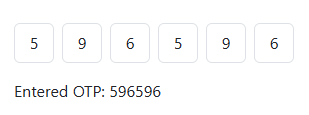
The Blazor Bootstrap OTPInput component presents a one-time password as separate numeric input fields. It supports keyboard navigation, paste distribution, change and completion callbacks, and clearing the entered code.
Parameters
| Name | Type | Default | Description | Added Version |
|---|---|---|---|---|
| ContainerCssClass | string? | null | CSS class applied to the element that contains the OTP fields. | 4.0.0 |
| ContainerCssStyle | string? | null | Inline CSS style applied to the element that contains the OTP fields. | 4.0.0 |
| Length | int | 6 | Number of numeric fields in the one-time password. | 4.0.0 |
Methods
| Name | Description | Added Version |
|---|---|---|
| ClearAsync() | Clears the OTP fields, publishes the updated value, and focuses the first field. | 4.0.0 |
Events
| Name | Type | Description | Added Version |
|---|---|---|---|
| OnOTPChanged | EventCallback<string> | Fires whenever the entered OTP changes. | 4.0.0 |
| OnOTPCompleted | EventCallback<string> | Fires after every OTP field contains a digit. | 4.0.0 |
Examples
Basic usage
Handle OnOTPChanged to observe the current value and OnOTPCompleted to submit or verify a complete code.
<OTPInput OnOTPChanged="OnOtpChanged"
          OnOTPCompleted="OnOtpCompleted" />

<p>Current value: @otp</p>

@code {
    private string otp = string.Empty;

    private Task OnOtpChanged(string value)
    {
        otp = value;
        return Task.CompletedTask;
    }

    private Task OnOtpCompleted(string value)
    {
        otp = value;
        return Task.CompletedTask;
    }
}
Custom length
Set Length to the number of numeric characters required by the verification flow. Pasted digits fill the remaining fields from the active position.
<OTPInput Length="5"
          OnOTPCompleted="VerifyAsync" />

@code {
    private Task VerifyAsync(string code)
    {
        return Task.CompletedTask;
    }
}
Clear the code
Use a component reference when a retry, resend, or cancel action needs to clear the entered code.
<OTPInput @ref="otpInput" />
<Button @onclick="ClearAsync">Clear</Button>

@code {
    private OTPInput otpInput = default!;

    private Task ClearAsync() => otpInput.ClearAsync();
}